> ## Documentation Index
> Fetch the complete documentation index at: https://docs.vibescale.run/llms.txt
> Use this file to discover all available pages before exploring further.
# App Dashboard
> Understand your app's central hub and how to track analysis progress.
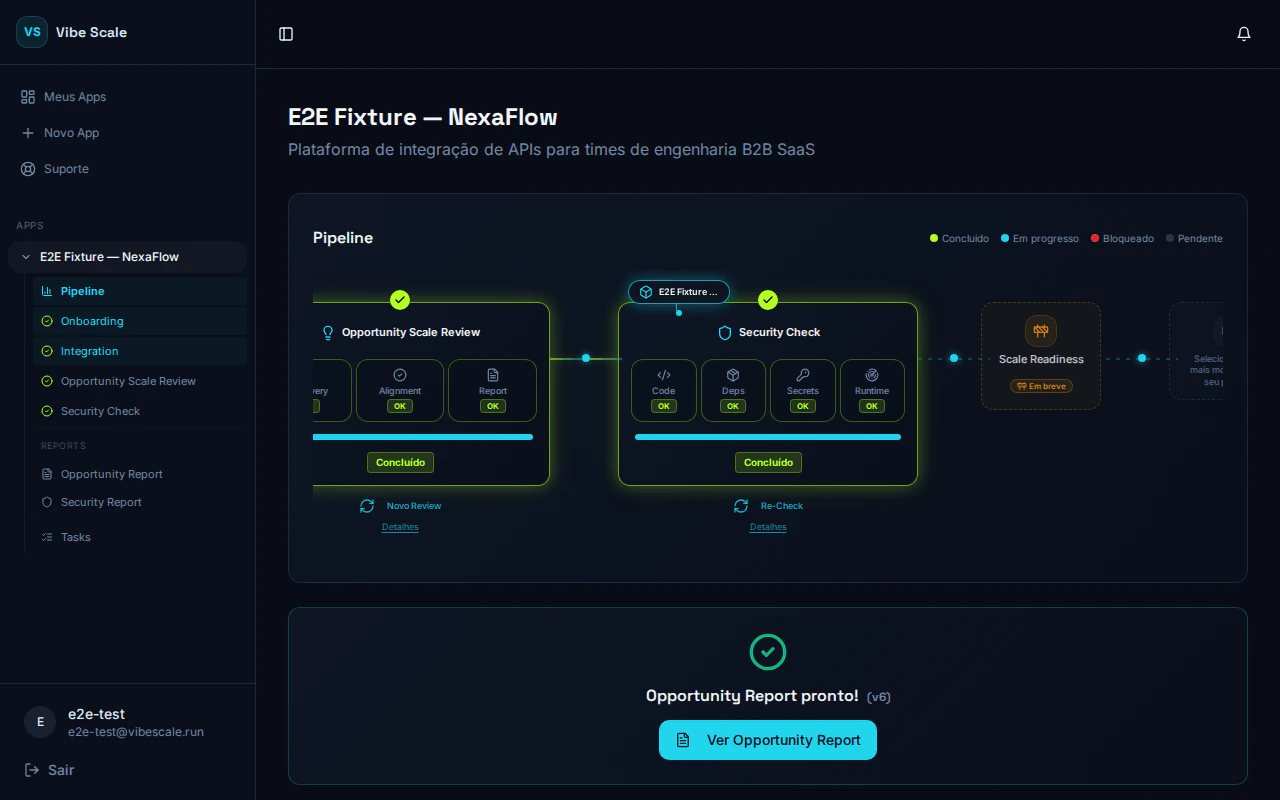 The dashboard is your app’s control center. From here, you start analyses, monitor progress in real time, and access the results of each stage.
## App Information
At the top of the dashboard, you’ll find the app’s name and description exactly as registered. These fields provide context for all generated reports.
## Analysis Tracks
VibeScale organizes analysis into two independent tracks, each with its own stages and status indicators.
**Discovery → Alignment → Report**
Assesses market maturity, product-market fit, and generates a report with positioning recommendations.
**Code → Deps → Secrets → Runtime**
Scans source code, dependencies, exposed secrets, and the production attack surface.
## Status Indicators
Each stage in a track shows one of the following states:
| Status | Meaning |
| ----------- | ---------------------------------- |
| Pending | The stage has not started yet. |
| In Progress | The analysis is currently running. |
| Completed | Results are available. |
## Action Buttons
* **Start Opportunity Analysis** — triggers the full Opportunity track (Discovery → Alignment → Report).
* **Start Security Check** — triggers the full Security track (Code → Deps → Secrets → Runtime).
* **Run Re-Check** — performs a new security scan after fixes.
* **Run New Review** — starts a new Opportunity Scale Review cycle, with protection against parallel runs to avoid duplication.
## Gate System
The **Security** track is only unlocked after completing the Opportunity analysis. Similarly, the **Re-Check** becomes available only after all critical and high vulnerabilities identified in the previous scan are resolved. This sequencing ensures you act on the right information in the right order.
## Welcome and Onboarding
When you access the dashboard, you may see a welcome banner that helps you start your app’s alignment flow. Just click to begin the Opportunity Scale Review analysis and follow the recommended steps.
The dashboard is your app’s control center. From here, you start analyses, monitor progress in real time, and access the results of each stage.
## App Information
At the top of the dashboard, you’ll find the app’s name and description exactly as registered. These fields provide context for all generated reports.
## Analysis Tracks
VibeScale organizes analysis into two independent tracks, each with its own stages and status indicators.
**Discovery → Alignment → Report**
Assesses market maturity, product-market fit, and generates a report with positioning recommendations.
**Code → Deps → Secrets → Runtime**
Scans source code, dependencies, exposed secrets, and the production attack surface.
## Status Indicators
Each stage in a track shows one of the following states:
| Status | Meaning |
| ----------- | ---------------------------------- |
| Pending | The stage has not started yet. |
| In Progress | The analysis is currently running. |
| Completed | Results are available. |
## Action Buttons
* **Start Opportunity Analysis** — triggers the full Opportunity track (Discovery → Alignment → Report).
* **Start Security Check** — triggers the full Security track (Code → Deps → Secrets → Runtime).
* **Run Re-Check** — performs a new security scan after fixes.
* **Run New Review** — starts a new Opportunity Scale Review cycle, with protection against parallel runs to avoid duplication.
## Gate System
The **Security** track is only unlocked after completing the Opportunity analysis. Similarly, the **Re-Check** becomes available only after all critical and high vulnerabilities identified in the previous scan are resolved. This sequencing ensures you act on the right information in the right order.
## Welcome and Onboarding
When you access the dashboard, you may see a welcome banner that helps you start your app’s alignment flow. Just click to begin the Opportunity Scale Review analysis and follow the recommended steps.