> ## Documentation Index
> Fetch the complete documentation index at: https://docs.vibescale.run/llms.txt
> Use this file to discover all available pages before exploring further.
# Opportunity report
> Understand what the report contains, how to interpret scores, and what to do next.
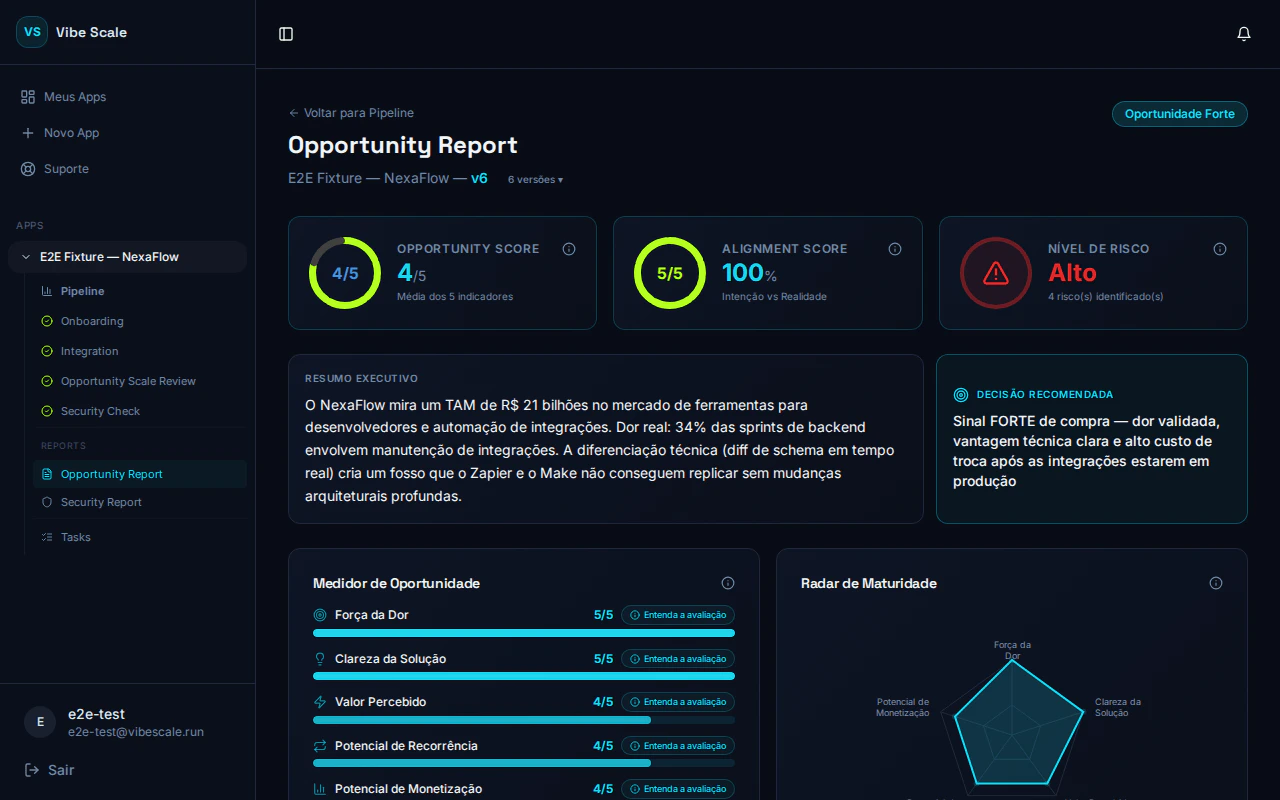 The Opportunity Report consolidates everything analyzed and confirmed in the previous steps into a visual strategic analysis — with scores, risks, positive signals, and concrete actions.
## What the report contains
### Analysis by dimension
The report evaluates your app across multiple market and product dimensions. Each dimension receives a score reflecting the strength of the opportunity on that axis, based on the data confirmed during Alignment.
### Positive signals
A list of favorable factors identified in the analysis — competitive differentiators, clarity of value proposition, addressable market size, and other points working in the app's favor.
### Identified risks
Areas of concern that could compromise product traction or growth. These risks are not verdicts — they are signals to anticipate problems before they become blockers.
### Priority actions
Up to three concrete actions, ordered by impact, that you can take to increase the app's potential. Each action is specific to your product's context — not generic advice.
## How to interpret scores
Indicates the app has solid fundamentals in that area. Use it as confirmation that you're on the right track — and as supporting evidence in conversations with investors or partners.
Indicates a gap worth addressing. Read the priority actions associated with that dimension to understand what could improve the result.
These offer the greatest leverage. Focused effort on them tends to move the overall score more than any other area. Prioritize them in your next product iterations.
## How to re-run the analysis
After implementing product improvements or adjusting your positioning, you can generate a new report to compare progress.
The **Run again** button is only unlocked after completing at least one [security check](/en/security/overview) cycle.
On the panel, click **Run again** to restart the full pipeline — Discovery, Alignment, and Report — with the current repository data.
The new run goes through Alignment again. Take the opportunity to update any field that has changed since the last analysis.
Each run generates an independent new report. The history of previous reports is not overwritten — you can compare your app's potential over time.
## Natural next step: security check
A validated market opportunity is worth more when the product is technically trustworthy. The recommended next step is to start the [security check](/en/security/overview).
Investors and technical partners increasingly ask for security evidence, not just traction. Having a clean security report is a concrete differentiator in due diligence processes.
The Opportunity Report consolidates everything analyzed and confirmed in the previous steps into a visual strategic analysis — with scores, risks, positive signals, and concrete actions.
## What the report contains
### Analysis by dimension
The report evaluates your app across multiple market and product dimensions. Each dimension receives a score reflecting the strength of the opportunity on that axis, based on the data confirmed during Alignment.
### Positive signals
A list of favorable factors identified in the analysis — competitive differentiators, clarity of value proposition, addressable market size, and other points working in the app's favor.
### Identified risks
Areas of concern that could compromise product traction or growth. These risks are not verdicts — they are signals to anticipate problems before they become blockers.
### Priority actions
Up to three concrete actions, ordered by impact, that you can take to increase the app's potential. Each action is specific to your product's context — not generic advice.
## How to interpret scores
Indicates the app has solid fundamentals in that area. Use it as confirmation that you're on the right track — and as supporting evidence in conversations with investors or partners.
Indicates a gap worth addressing. Read the priority actions associated with that dimension to understand what could improve the result.
These offer the greatest leverage. Focused effort on them tends to move the overall score more than any other area. Prioritize them in your next product iterations.
## How to re-run the analysis
After implementing product improvements or adjusting your positioning, you can generate a new report to compare progress.
The **Run again** button is only unlocked after completing at least one [security check](/en/security/overview) cycle.
On the panel, click **Run again** to restart the full pipeline — Discovery, Alignment, and Report — with the current repository data.
The new run goes through Alignment again. Take the opportunity to update any field that has changed since the last analysis.
Each run generates an independent new report. The history of previous reports is not overwritten — you can compare your app's potential over time.
## Natural next step: security check
A validated market opportunity is worth more when the product is technically trustworthy. The recommended next step is to start the [security check](/en/security/overview).
Investors and technical partners increasingly ask for security evidence, not just traction. Having a clean security report is a concrete differentiator in due diligence processes.