> ## Documentation Index
> Fetch the complete documentation index at: https://docs.vibescale.run/llms.txt
> Use this file to discover all available pages before exploring further.
# Task Kanban
> Manage your app's actions on a visual board with progress columns.
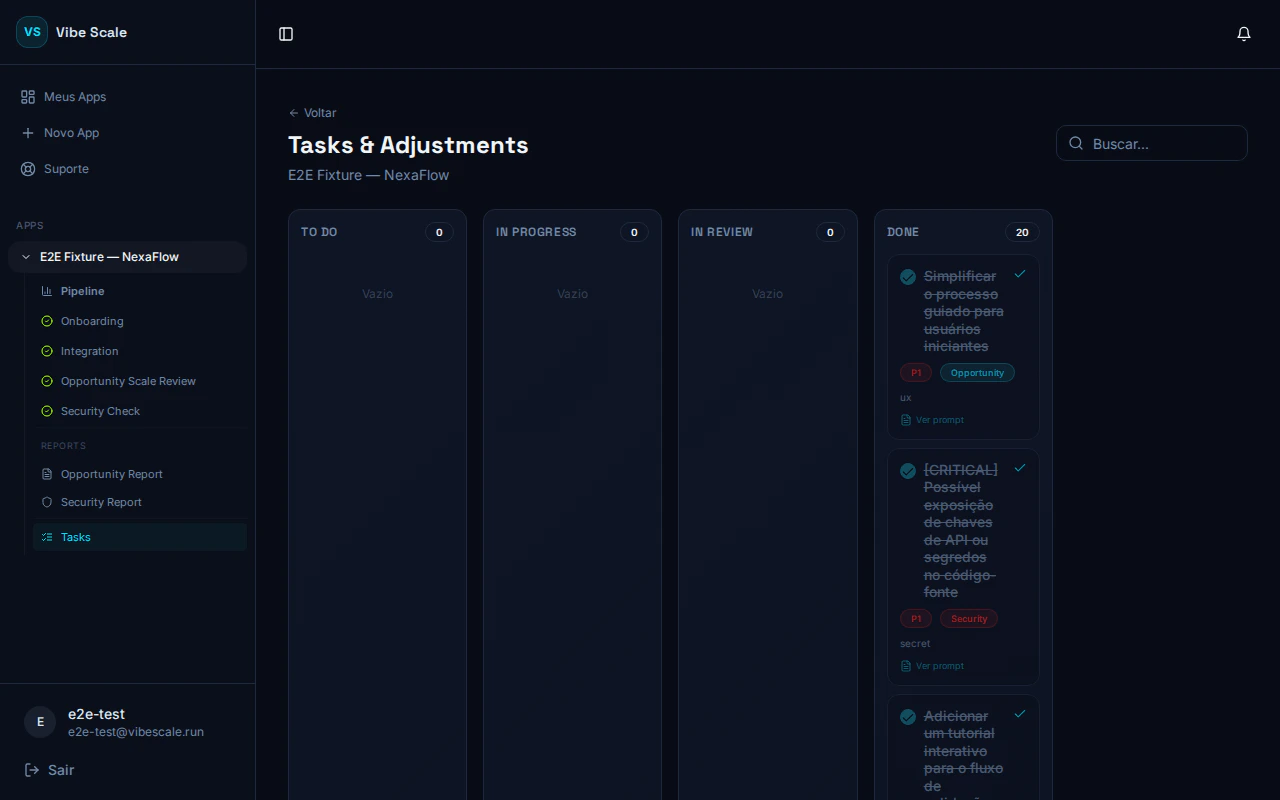 The **Task Kanban** centralizes everything you need to do in your app in one place. Tasks are automatically generated from two sources:
* **Opportunity** — actions identified through market opportunity analysis
* **Security** — fixes recommended by the security report
You don’t need to create tasks manually. VibeScale generates and prioritizes them for you.
## The 4 columns of the board
Identified tasks waiting to be started. Entry point for all new actions.
Tasks you have already started working on.
Tasks completed internally and awaiting validation.
Completed tasks. Security tasks marked here help unlock the Re-Check.
## Opening a task
Click any card to open the detail panel. There you’ll find:
* **Full title and description** of the recommended action
* **Source badge** — Opportunity or Security
* **Internal notes field** — record what was done, PR links, or context for the team
* **Save comment button** — saves your notes
* **Column selector** — moves the task to another stage
* **Complete button** — marks the task as done and moves it to DONE
* **Reopen task button** — available for completed tasks, lets you move the task back to TO DO
## Copying the AI prompt
Each card shows a clipboard icon. Click it to copy the **remediation prompt** generated by VibeScale. Paste it directly into your preferred AI editor — Copilot, Cursor, Bolt, or similar.
## Filtering tasks
Use the search bar at the top of the board to filter tasks by title. Filtering happens in real time.
## Security task priority
Tasks originating from the security report have their priority automatically mapped:
| Severity | Priority |
| -------- | -------- |
| Critical | P1 |
| High | P2 |
| Medium | P3 |
Complete Critical and High security tasks to unlock the **Re-Check** in the security report.
The **Task Kanban** centralizes everything you need to do in your app in one place. Tasks are automatically generated from two sources:
* **Opportunity** — actions identified through market opportunity analysis
* **Security** — fixes recommended by the security report
You don’t need to create tasks manually. VibeScale generates and prioritizes them for you.
## The 4 columns of the board
Identified tasks waiting to be started. Entry point for all new actions.
Tasks you have already started working on.
Tasks completed internally and awaiting validation.
Completed tasks. Security tasks marked here help unlock the Re-Check.
## Opening a task
Click any card to open the detail panel. There you’ll find:
* **Full title and description** of the recommended action
* **Source badge** — Opportunity or Security
* **Internal notes field** — record what was done, PR links, or context for the team
* **Save comment button** — saves your notes
* **Column selector** — moves the task to another stage
* **Complete button** — marks the task as done and moves it to DONE
* **Reopen task button** — available for completed tasks, lets you move the task back to TO DO
## Copying the AI prompt
Each card shows a clipboard icon. Click it to copy the **remediation prompt** generated by VibeScale. Paste it directly into your preferred AI editor — Copilot, Cursor, Bolt, or similar.
## Filtering tasks
Use the search bar at the top of the board to filter tasks by title. Filtering happens in real time.
## Security task priority
Tasks originating from the security report have their priority automatically mapped:
| Severity | Priority |
| -------- | -------- |
| Critical | P1 |
| High | P2 |
| Medium | P3 |
Complete Critical and High security tasks to unlock the **Re-Check** in the security report.