
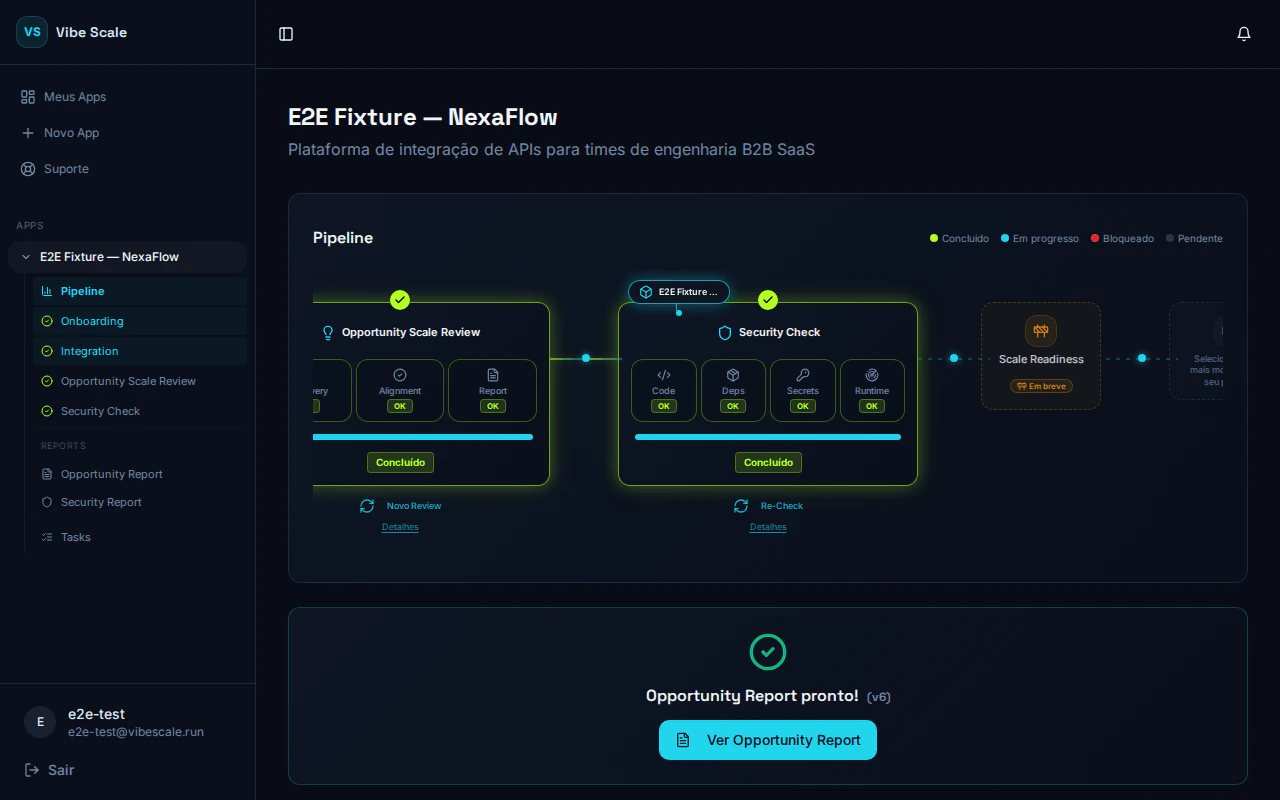
App dashboard in VibeScale — central hub with Opportunity and Security tracks
App Information
At the top of the dashboard, you’ll find the app’s name and description exactly as registered. These fields provide context for all generated reports.Analysis Tracks
VibeScale organizes analysis into two independent tracks, each with its own stages and status indicators.Opportunity
Discovery → Alignment → ReportAssesses market maturity, product-market fit, and generates a report with positioning recommendations.
Security
Code → Deps → Secrets → RuntimeScans source code, dependencies, exposed secrets, and the production attack surface.
Status Indicators
Each stage in a track shows one of the following states:Action Buttons
- Start Opportunity Analysis — triggers the full Opportunity track (Discovery → Alignment → Report).
- Start Security Check — triggers the full Security track (Code → Deps → Secrets → Runtime).
- Run Re-Check — performs a new security scan after fixes.
- Run New Review — starts a new Opportunity Scale Review cycle, with protection against parallel runs to avoid duplication.
Gate System
The Security track is only unlocked after completing the Opportunity analysis. Similarly, the Re-Check becomes available only after all critical and high vulnerabilities identified in the previous scan are resolved. This sequencing ensures you act on the right information in the right order.